The Settings Window
This section explains about the settings that appear in the Settings Window.
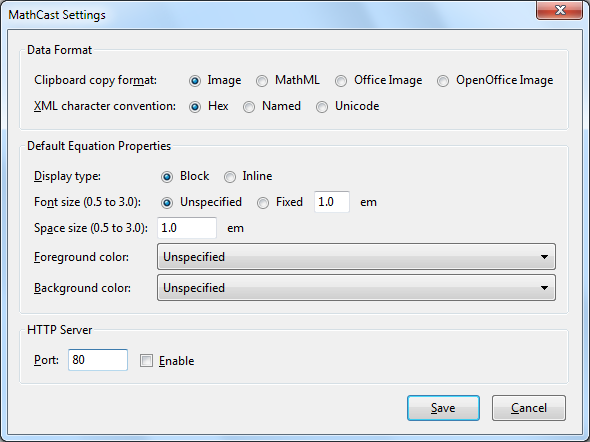
Clipboard Copy Format
- Image - Creates an exact copy of the selected equation's image as it is displayed on the screen.
This is the most general purpose copy format. Use it to copy to other applications as well as for email and online word processors.
- MathML - Copies the mathml text used internally by MathCast. You can use this setting to copy an equation object to Microsoft Word 2007 and newer
(note that it doesn't work perfectly in this version). You can also use MathML copy the mathml to a text editor.
- Office Image - Copies an Enhanced Metafile Image that can be used with Microsoft Office 2003 and newer. This image has a higher detail than the basic image copy format.
- OpenOffice Image - Copies an Enhanced Metafile Image that can be used with Apache Open Office (AKA OpenOffice.org). This image has a higher detail than the basic image copy format. Use this setting also for Microsoft Office 2000.
Note: Use Image or MathML to copy between different running instances of MathCast (when working with more than one MathCast window open).
XML Layout
MathCast gives you some control over the output of the MathML it produces.
-
Hex – MathML characters are replaced with XML standard hexadecimal
notation (for example the character “π” is replaced with “π”).
-
Named – MathML characters are replaced by their name (for example the character
“π” is replaced with “π”).
-
Unicode – MathML characters are left as Unicode characters
(“π” remains “π”).
If Unicode is selected, MathCast will save files with "UTF-8" encoding type, otherwise it will
save in ASCII format.
Display Types
MathCast supports two display types for equations: “Block” and “Inline”.
Textbooks usually use “Block” when centering equations, like this:
The Schrodinger equation states that:
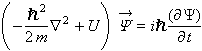
Where the m stands for…
And they use “Inline” when writing an equation in the middle of a sentence, like this:
The Schrodinger equation,  ,
is one of the fundamental equations in Quantum Physics…
,
is one of the fundamental equations in Quantum Physics…
Notice the differences in the parenthesis size and in the size of some of the characters.
Math Styles
You can set the default size, color and background color for your equations.
You can also set teh default size for spaces in equations.
Enable HTTP Server
MathCast allows people to work together on equation lists over a network and across the Internet.
This feature is described more in detail in the section labeled
Downloading Equation Lists.
To enable this feature check the checkbox, then choose the port number for incomming connections, click on "set", and restart MathCast for the settings to take effect.